
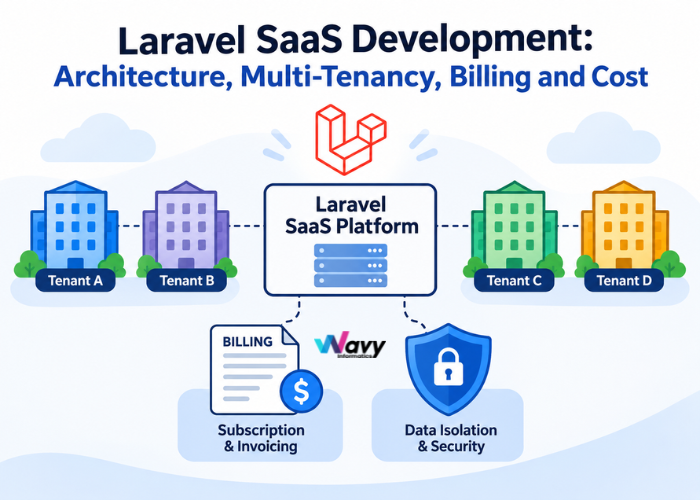


Building a SaaS product is not the same as building a website with a login. The moment you have paying customers, you need to keep every customer’s data separate, charge them correctly, switch features on and off by plan, and measure what each account uses. Get those foundations wrong and you will be rewriting the product in year two, usually while customers are watching.
Laravel is one of the most practical frameworks for avoiding that outcome. This guide explains how a Laravel SaaS platform is put together, which decisions matter most before you write any code, and what a realistic budget and timeline look like.
Laravel does not magically make a SaaS product easy. What it offers is a mature set of first-party and community packages that cover the problems almost every SaaS product has to solve. That means your team spends its time on your product’s unique features instead of reinventing billing, queues and authentication.
| SaaS need | Laravel tool | What it does |
|---|---|---|
| Subscription billing | Laravel Cashier | Plans, trials, upgrades, proration, invoices and webhooks with Stripe or Paddle |
| Feature flags and plan gating | Laravel Pennant | Turn features on per user, per tenant or per plan; run staged rollouts |
| API authentication | Sanctum or Passport | Token auth for mobile apps, SPAs and third-party integrations |
| Background work | Queues and Horizon | Reliable jobs for emails, provisioning, reports and billing tasks, with monitoring |
| High request volume | Laravel Octane | Keeps the application in memory between requests for higher throughput |
| Multi-tenancy | Tenancy for Laravel (stancl/tenancy) or Spatie’s multitenancy package | Tenant identification, context switching and per-tenant migrations |
| Admin and back office | Filament or Nova | Fast internal dashboards for support and operations teams |
Laravel is also easy to hire for, well documented and backed by a large community, which lowers long-term risk. That matters more than benchmarks for most SaaS businesses.
Four things change the way you design the system:
This is the most important architectural decision in the project, and it is expensive to change later. There are three common approaches.
| Model | How it works | Strengths | Trade-offs |
|---|---|---|---|
| Single database, shared tables | Every tenant-owned table has a tenant ID column, and queries are scoped automatically | Cheapest to run, simplest to migrate, easy cross-tenant reporting | A missing scope can leak data; one heavy tenant can slow others; harder to meet strict compliance needs |
| Separate schema per tenant | Each tenant gets its own schema inside one database server (mainly PostgreSQL) | Stronger separation than shared tables with one server to manage | Migrations run per schema; tooling is less common than the other two options |
| Separate database per tenant | Each tenant gets a dedicated database, created at signup | Strongest isolation, easy per-tenant backup, restore and data residency | Higher infrastructure and operations cost; migrations run across many databases |
Whichever model you choose, write automated tests that try to read another tenant’s data and confirm they fail. Isolation that is not tested is isolation you are hoping for.
Laravel Cashier wraps Stripe and Paddle so your code talks to a clean PHP API instead of raw payment APIs. Attach the billable trait to the model that pays, which is usually a Team or Organisation rather than an individual user.
A few rules prevent most billing bugs:
Instead of scattering “if plan equals Pro” checks across the code, define each capability as a feature flag. Laravel Pennant lets you decide per tenant whether a feature is active, based on plan, beta status or a percentage rollout.
This gives you three useful abilities: gate premium features by plan, release new features to a few tenants before everyone, and grant a customer early access without changing their subscription. It also keeps your plan definitions in one place, so pricing changes do not require hunting through the code.
If you charge per seat, per API call, per message or per gigabyte, you need accurate usage data. The reliable pattern is an append-only events table. Each billable action is stored as a new row with the tenant, the event type, the quantity and a timestamp. At the end of the billing period you add up the rows.
Avoid a single “usage counter” column that you increment. Under heavy traffic, concurrent requests can overwrite each other, and when a customer disputes an invoice you have no history to show them. Add a unique idempotency key to each event so a retried request is never counted twice. For Stripe-based usage billing, you can report totals through Stripe’s meter events, which recent Cashier versions support. Check the current Cashier documentation for the exact approach before implementing.
When a customer signs up, several things need to happen in order: create the tenant, set up its database or workspace, add default data, create the first admin user, start the trial, and send a welcome email. If step four fails, you must not leave behind a half-built account.
Apply rate limits per tenant, not per IP address. A company with 50 employees behind one office connection should not be blocked by limits designed for individual users. Laravel’s rate limiter lets you key limits by tenant and vary them by plan.
Monitor request volume, error rates, queue backlog, database load and storage for each tenant. One noisy customer can degrade the platform for everyone, and per-tenant metrics let you throttle or contact that customer before others notice.
| Phase | What happens | Typical duration |
|---|---|---|
| Discovery and architecture | Define users, plans, tenancy model, integrations and success metrics; document key decisions | 1–2 weeks |
| Core MVP | Authentication, tenant workspace, the one or two features customers will pay for, admin panel | 6–10 weeks |
| Billing and plans | Cashier integration, trials, plan limits, invoices, feature flags | 2–3 weeks |
| Beta and hardening | Real users, testing, security review, performance tuning, monitoring | 2–4 weeks |
| Growth | Integrations, analytics, SSO, public API, performance work as customer numbers rise | Ongoing |
Most focused SaaS MVPs take roughly three to five months from kickoff to first paying customers. The biggest schedule risk is not technology. It is scope: teams that try to launch with every feature a competitor has usually launch late.
Costs vary widely with scope, design depth and team location. The ranges below are indicative figures for planning, not quotes. A detailed estimate needs a short discovery phase.
| Product stage | Offshore team (for example India) | Agency in the USA, UK or Australia |
|---|---|---|
| MVP with one core workflow, billing and an admin panel | $15,000–$40,000 | $50,000–$120,000 |
| Growth-stage product with integrations, reporting and roles | $40,000–$90,000 | $120,000–$250,000 |
| Enterprise-grade platform with SSO, audit logs, complex permissions | $90,000 and above | $250,000 and above |
After launch, plan for cloud hosting, error monitoring, email and SMS services, payment processing fees (a percentage of each transaction, set by your provider) and ongoing maintenance. A common rule of thumb is to reserve 15 to 20 percent of the original build cost per year for updates, security patches, framework upgrades and small improvements.
Look for a team that asks about your customers and pricing before it talks about technology, documents architecture decisions so you are not locked in, and can show comparable work. Ask who will actually write the code, how they handle testing and code review, and what happens after launch.
At Wavy Informatics, we build web platforms and custom software for startups and growing businesses, and our Laravel developers work in flexible engagement models. If you want a dedicated Laravel engineer or a full team, see our Hire Laravel Developers page.
Yes. Laravel includes or integrates with the tools SaaS products need most: subscription billing through Cashier, feature flags through Pennant, API authentication through Sanctum, queues with Horizon, and multi-tenancy through established packages. Its large developer community also makes hiring and maintenance easier.
There is no single best option. A shared database is the cheapest and simplest for many small customers. A database per tenant gives the strongest isolation and suits regulated industries or large customers. Many products combine both as they grow.
A focused MVP typically takes three to five months including discovery, core features, billing and testing. Tight scope is the best way to shorten that timeline.
Yes, with sound architecture. Queues, caching, database indexing, Octane and per-tenant monitoring all help. Many SaaS products serve large customer bases on Laravel.
Not at the start. A responsive web app is usually enough to validate the idea. If you add mobile later, a Laravel API can power native or cross-platform apps.
Tell us what you are building and we will help you choose the right architecture, scope an MVP and estimate the budget. Book a free consultation or send us your requirements.
| Disclaimer: Costs, rates and timelines in this article are indicative and for information only. Every company prices differently, and actual costs depend on your project’s scope, features and team. This is not a quote. For an accurate estimate, please contact our team. |